
La colaboración es esencial para la escala global, pero la seguridad de los datos es primordial. MultiLipi's Espacio de Trabajo del Equipo le permite asignar acceso a traductores, desarrolladores y gerentes de proyecto sin compartir credenciales de inicio de sesión confidenciales. Puede asignar permisos granulares , asegurando que los miembros del equipo interactúen solo con los proyectos y herramientas específicos requeridos para su función.
Este plano cubre el ciclo de vida de la gestión de usuarios: Aprovisionamiento , Auditoría , y Desaprovisionamiento .
Control de acceso basado en roles (RBAC)
Nunca compartas tus credenciales maestras. En su lugar, crea cuentas individualizadas con permisos adaptados a las responsabilidades de cada usuario. Esto garantiza registros de auditoría completos y la capacidad de revocar el acceso al instante cuando los miembros del equipo cambian.
1. Acceso al Directorio del Equipo
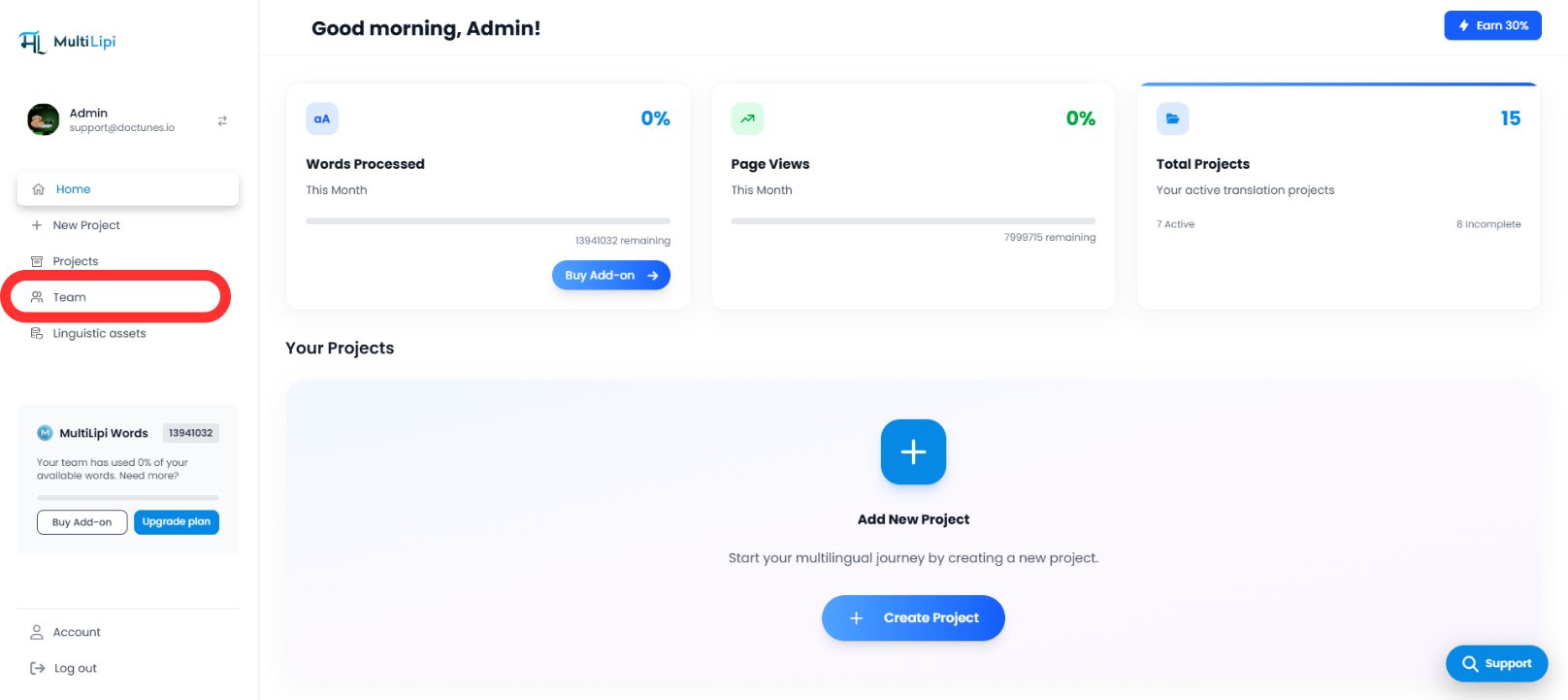
La pestaña Equipo sirve como centro de comando para todos los permisos de usuario.
Navegar
Desde la barra lateral de tu Panel de MultiLipi, selecciona Equipo .
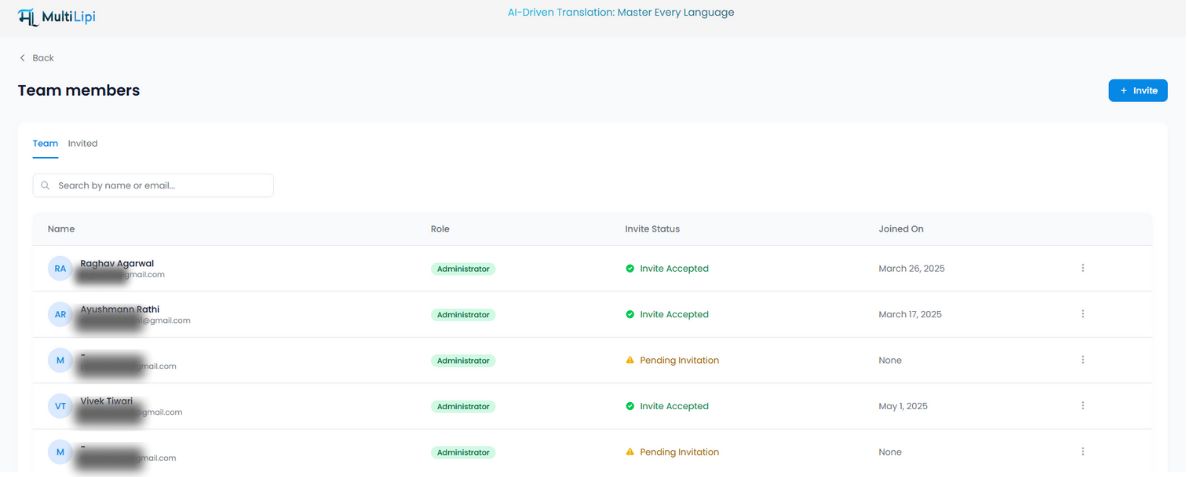
Vista de Auditoría
Verá una tabla unificada que enumera a todos los usuarios activos, sus roles asignados, el ámbito de acceso (dominios específicos) y el estado actual ( Activo vs. Invitación pendiente ).
2. Aprovisionamiento de Acceso (Invitación de Miembros)
Para incorporar a un nuevo colaborador:
Iniciar Invitación
Haz clic en Invitar botón en la esquina superior derecha del espacio de trabajo.
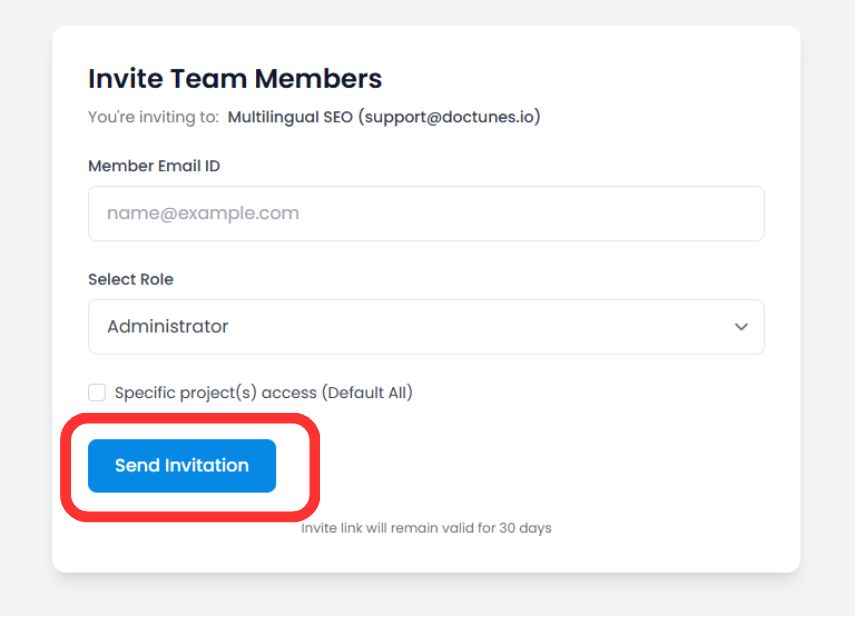
Definir credenciales
Correo electrónico
Introduce la dirección de correo electrónico corporativo del usuario.
Asignación de roles
Seleccione el nivel de privilegio apropiado (por ejemplo, Administrador para un control total, Colaborador solo para edición de traducciones).
Ámbito del Proyecto (Opcional)
Restringir al usuario a dominios específicos (por ejemplo, Asignar "Traductor A" solo al proyecto alemán).
Enviar invitación
Haz clic Invitar por Correo .
Nota de seguridad
El enlace de invitación seguro caduca automáticamente en 30 días para evitar el acceso no autorizado desde enlaces obsoletos.
3. Gestión de Ciclos de Vida de Acceso
La gobernanza es un proceso continuo. Puede modificar o revocar permisos al instante a medida que cambian las estructuras del equipo.
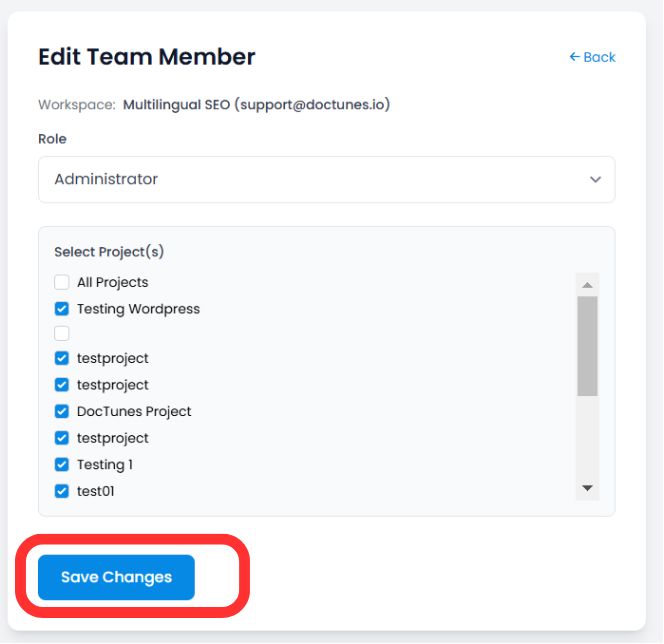
Modificación de roles (La función "Editar")
Si un usuario necesita privilegios elevados o acceso a un nuevo proyecto:
Localice al usuario en la Equipo tabla.
Haz clic en Tres Puntos (⋮) icono en la columna Acciones.
Selecciona Editar .
Actualiza su Rol o Asignación de Proyecto y haz clic en Guardar Cambios . Los nuevos permisos se aplican de inmediato.
Revocación de acceso (Offboarding)
Cuando un miembro del equipo se va o finaliza un contrato, asegura su cuenta inmediatamente:
Paso 1
Haz clic en Icono de Papelera/Eliminar en la columna Acciones.
Paso 2
Confirmar la eliminación.
Impacto
La sesión del usuario se termina y pierde el acceso al panel al instante .
Resumen: Mejores Prácticas de Colaboración
| Acción | Mejor Práctica |
|---|---|
| Asignación de roles | Usa el Principio de mínimo privilegio . Solo otorgue acceso de Administrador a las partes interesadas de confianza. |
| Alcance del proyecto | Aísle a las agencias externas a proyectos específicos para evitar que vean datos no relacionados. |
| Auditorías periódicas | Revisa la pestaña Equipo mensual para eliminar usuarios inactivos o invitaciones pendientes. |
🔒 Seguridad a Escala: Al implementar RBAC granular, se asegura de que sus operaciones de traducción puedan escalar a nivel mundial sin comprometer la integridad de los datos ni exponer información confidencial del proyecto a miembros del equipo no autorizados.