
La traducción automática proporciona la base, pero la localización perfecta a menudo requiere matices. MultiLipi integra un Motor de Sugerencias Generativas directamente en tu flujo de trabajo de edición. Ya sea que necesites acortar un titular para que quepa en la pantalla de un móvil o hacer que un aviso legal suene más formal, puedes activar reescrituras de IA bajo demanda en tres entornos específicos.
Esta guía detalla los protocolos operativos para el Editor Lado a Lado, Editor Virtual, y la Motor de Variabilidad.
1. El Editor Lado a Lado (Precision Workbench)
El entorno de vista de código para control granular.
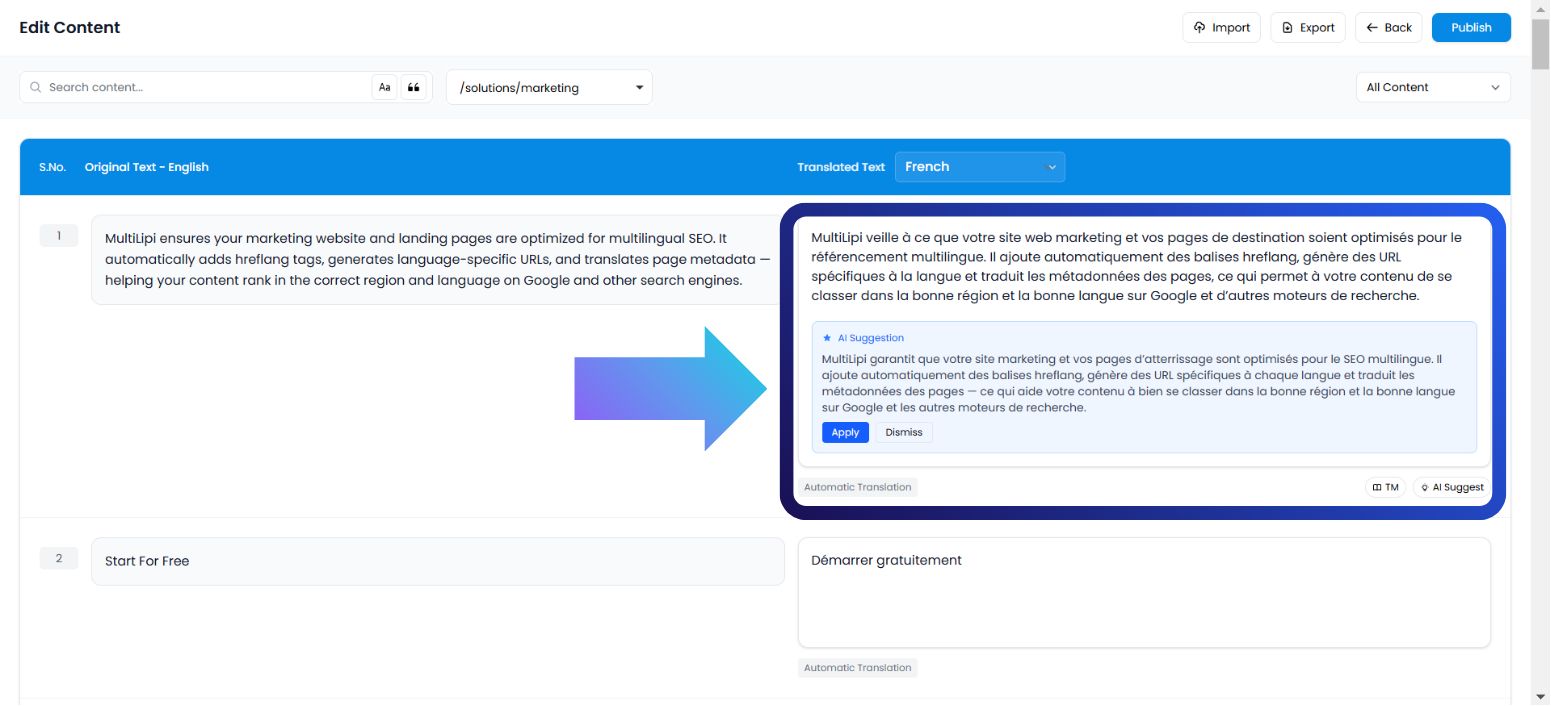
Esta interfaz muestra tu contenido como una lista estructurada de pares de cadenas (Origen vs. Destino). Es el entorno ideal para lingüistas o editores que necesitan centrarse puramente en el texto sin distracciones visuales.
Caso de Uso:
Reformular una oración específica para que sea más amigable con el SEO o corregir un matiz gramatical en un párrafo denso.
Protocolo de Ejecución:
Acceder al Panel: Inicie sesión en su centro de comando MultiLipi.
Seleccionar Proyecto: Haga clic en la ficha del proyecto específica.
Navegar: Abrir el Idiomas pestaña.
Interfaz de Lanzamiento: Selecciona Editor Lado a Lado de las opciones.
Desencadenar IA: Localiza el bloque de texto específico. En el lado traducido (columna derecha), haz clic en el Sugerencia de IA botón.
Compromiso:
Aplicar: Reemplaza el texto actual con la versión de IA (Consume cuota).
Descartar: Descarta la sugerencia (Costo Cero).
2. El Editor Virtual (Entorno de Superposición)
El contexto WYSIWYG (Lo que ves es lo que obtienes).
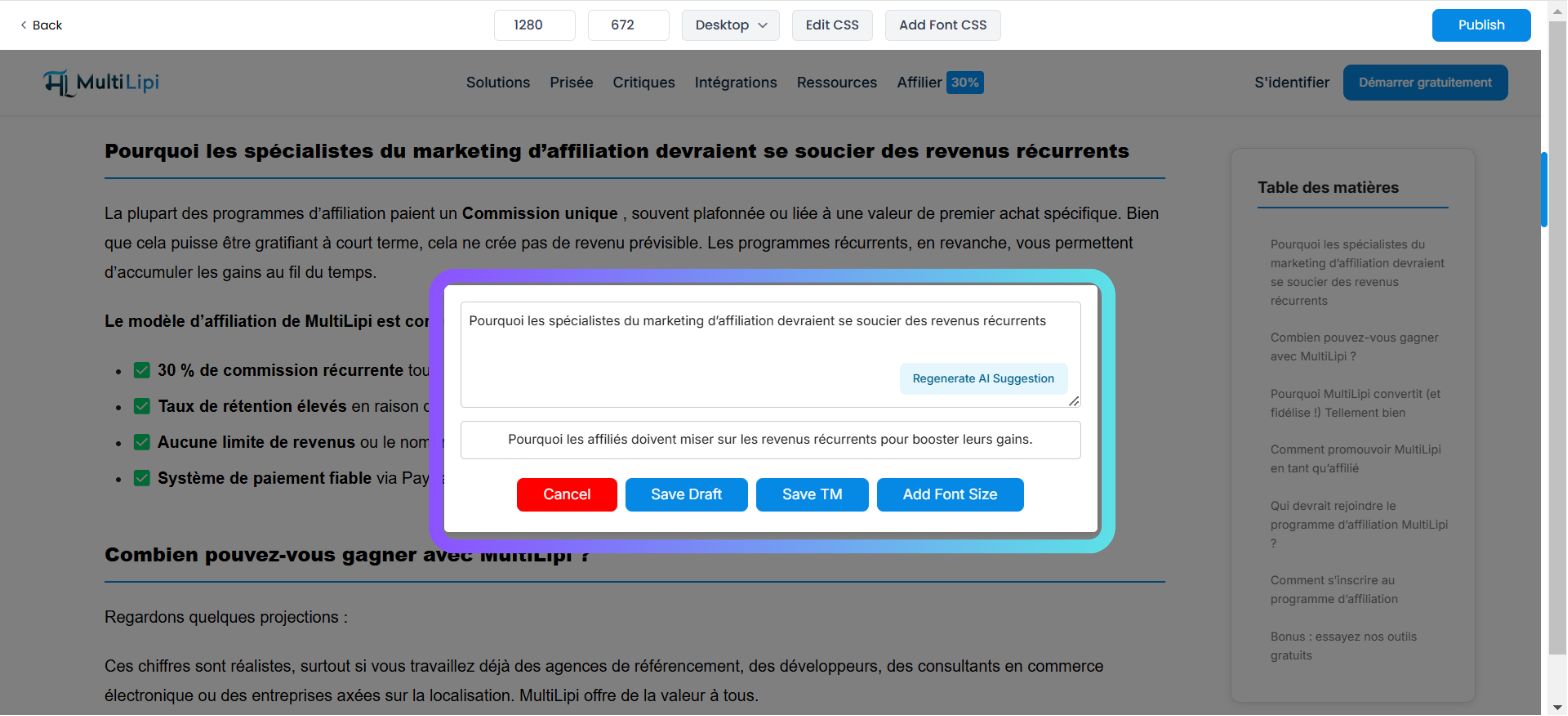
Esta interfaz superpone el motor de traducción sobre su sitio web en vivo. Le permite editar texto "in situ", asegurando que su nueva traducción encaje dentro de los límites visuales de sus botones, banners y menús.
Caso de Uso:
Acortar el título de una entrada de blog que rompe el diseño o reescribir un botón de Llamada a la Acción (CTA) para que sea más impactante.
Protocolo de Ejecución:
Navegar: Ve a Panel → Proyectos → URLs.
Lanzar vista previa: Haz clic en Editar botón debajo del Vista previa virtual columna para una página específica.
Seleccionar Elemento: Pasa el cursor sobre y haz clic en cualquier bloque de texto editable en la vista previa en vivo.
Desencadenar IA: Toca el Sugerencia de IA botón en la barra de herramientas emergente.
Compromiso: Revisa la opción generada y haz clic en Aplicar si encaja en tu diseño.
3. El Motor de Variabilidad (Diversidad Estilística)
Generar alternativas semánticas.
A veces, una sola traducción no es suficiente. El Motor de Variabilidad genera múltiples versiones estilísticas de la misma oración, lo que le permite elegir la que mejor se adapte a la voz de su marca (por ejemplo, Profesional vs. Persuasivo vs. Conciso).
Caso de Uso:
Pruebas A/B de diferentes ganchos de marketing para el titular de una página de destino.
Protocolo de Ejecución:
Acceder a la Configuración: Abre el panel de tu Proyecto.
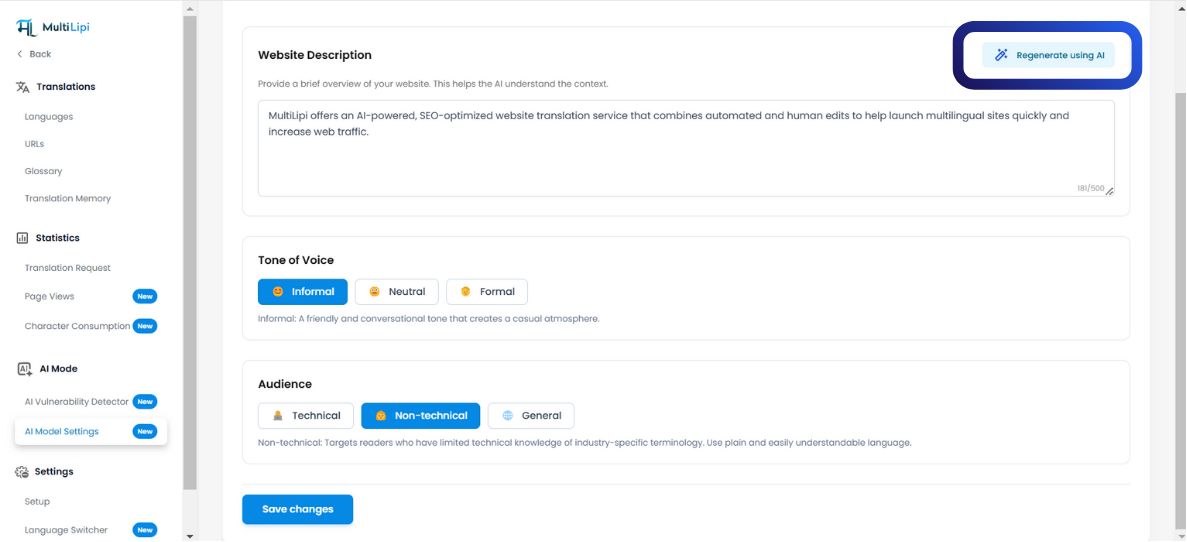
Navegar: Busca el Modo IA sección en la barra lateral.
Configurar: Haz clic en el Configuración del Modelo de IA icono.
Generar: Elige tu deseado Formato de Contenido de IA. El sistema presentará múltiples variaciones basadas en la estructura de la oración.
Aplicar rápido: Selecciona la versión que prefieras para actualizar instantáneamente la memoria de traducción.
4. Gobernanza de Cuotas (Lógica de Facturación)
Comprender el costo de la generación.
Es fundamental entender cuándo se deducen los créditos de tu plan.
| Acción | Impacto en la Cuota |
|---|---|
| Ver Sugerencia | Gratis. Generar una vista previa no cuesta créditos. |
| Aplicar Sugerencia | Facturable. La cuota se deduce solo cuando haces clic en "Aplicar". |
| Descartar Sugerencia | Gratis. Rechazar un borrador de IA no cuesta nada. |
Nota del Plan:
Los planes de nivel gratuito tienen límites estrictos en el consumo de palabras de IA. Los niveles de pago ofrecen límites de generación ampliados o ilimitados según su acuerdo empresarial.