

El "Script de traducción" es el agente ejecutable que entrega su contenido localizado. Por defecto, MultiLipi inyecta este agente inmediatamente al configurar para asegurar un despliegue rápido. Sin embargo, usted mantiene control absoluto sobre este flujo. Puede cambiar el Habilitar script cambia para activar o desconectar instantáneamente la conexión entre tu sitio web y nuestro motor de traducción.
Esta guía detalla los estados operativos y el protocolo para gestionar este control maestro.
1. Los Estados de Inyección
Comprender los modos activo y latente.
Estado: ACTIVADO (Inyección Activa)
Comportamiento: La carga útil de JavaScript se ejecuta en cada carga de página.
Experiencia de Usuario: Los visitantes ven el selector de idioma y el contenido traducido.
Telemetría: Las vistas de página y el consumo de caracteres se rastrean activamente y se deducen de tu cuota.
Estado: DESACTIVADO (Modo inactivo)
Comportamiento: El script se suprime en el origen. No se carga en el navegador del usuario.
Experiencia de Usuario: Los visitantes ven solo su sitio web original (fuente), exactamente como existe en su servidor.
Telemetría: Cero consumo de cuota. No se realizan llamadas a la API.
2. Protocolo de Configuración
Accediendo al interruptor de apagado.
Para cambiar el estado de inyección, sigue esta ruta de navegación específica en tu centro de comando:
Paso 1: Acceder al panel
Inicie sesión en su Panel de MultiLipi.
Paso 2: Seleccionar Proyecto
Desde el menú de la izquierda, navega a Proyectos.
Seleccione el proyecto/sitio web específico que desea administrar.
Paso 3: Acceder a la Configuración de Configuración
En el panel izquierdo, localiza el Configuración sección.
Haz clic en Configuración.
Paso 4: Cambiar estado
Desplázate para encontrar el interruptor Habilitar script.
Acción: Activa o desactiva el interruptor.
Latencia: El cambio se propaga inmediatamente al borde.
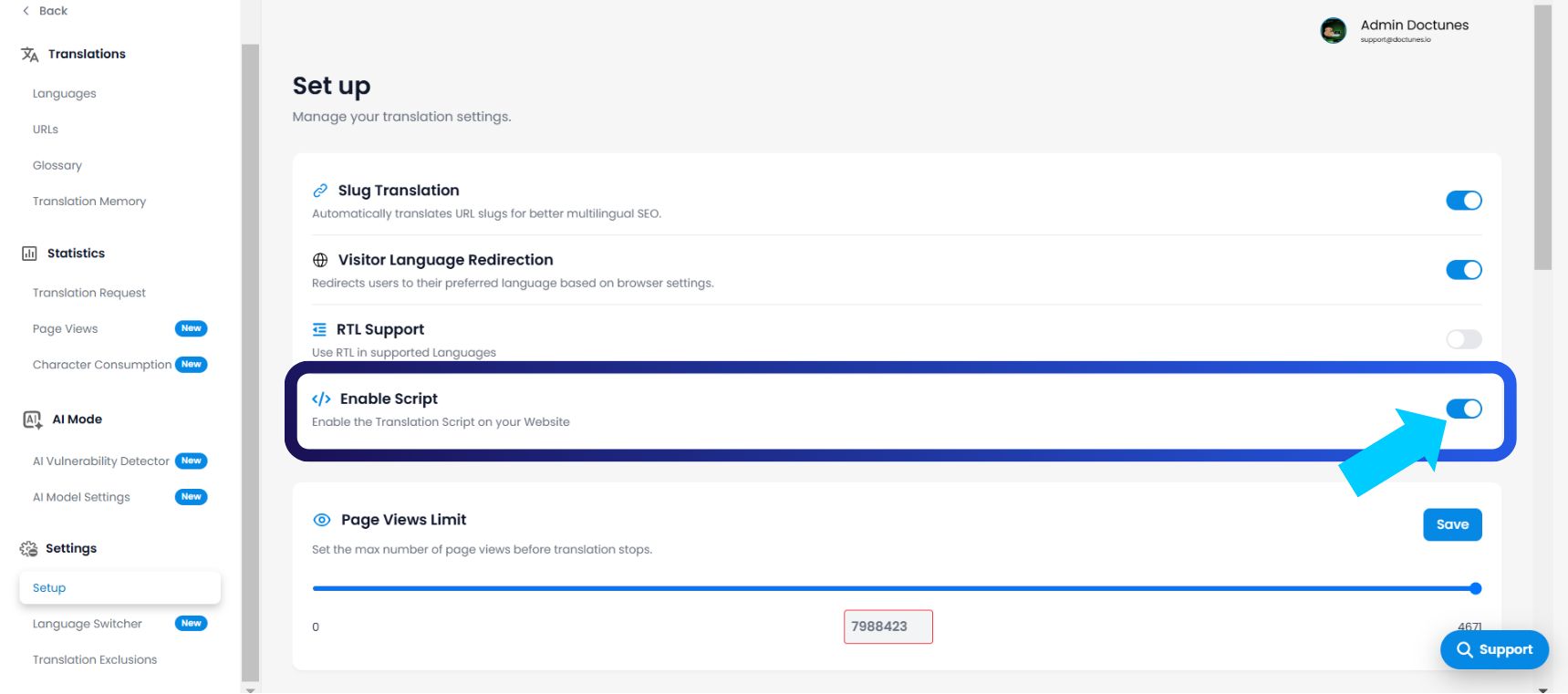
3. Casos de Uso Operacionales
Cuándo desconectar.
¿Por qué deshabilitarías un servicio que pagaste? Esta función es crítica para los flujos de trabajo de DevOps y Presupuesto:
Etapa y rediseño: Si estás implementando una actualización importante de código en tu sitio principal, deshabilita el script para evitar que el motor de traducción intente traducir estructuras HTML rotas o a medio terminar.
Defensa de Cuotas: Si te acercas al límite de tu plan (por ejemplo, 98% de las vistas de página utilizadas) y no deseas actualizar todavía, deshabilita el script para evitar cargos por exceso hasta el próximo ciclo de facturación.
Modo Sigiloso (Pre-lanzamiento): Puedes mantener el script deshabilitado mientras tu equipo revisa manualmente las traducciones en el panel. Una vez que se complete la fase de control de calidad, activa el interruptor para salir en vivo.
4. Matices Técnicos
Comprendiendo las implicaciones.
Persistencia de datos: Deshabilitar el script no es destructivo. No elimina tu Memoria de Traducción, Glosario ni la configuración del proyecto. Tus datos permanecen congelados hasta que vuelvas a habilitar el servicio.
Alcance del proyecto: Esta es una configuración a nivel de proyecto. Deshabilitar el script en el "Sitio A" no afecta el estado activo del "Sitio B".
Proxies Personalizados: Para usuarios empresariales que ejecutan integraciones de proxy manuales, deshabilitar este interruptor evita conflictos de "Doble Inyección" durante la depuración.