
En la tipografía global, "Direccionalidad" es crítico. Idiomas como el árabe y el hebreo se leen de derecha a izquierda (RTL). Si simplemente traduce el texto sin invertir el diseño, la experiencia del usuario se siente rota (por ejemplo, el texto se alinea a la izquierda, la puntuación está mal colocada).
El MultiLipi Motor RTL es una capa de estilo dinámica que detecta estos idiomas e "invierte" automáticamente el CSS de su sitio web, invirtiendo márgenes, relleno y alineación de texto, para garantizar una experiencia de lectura nativa sin necesidad de escribir una sola línea de código personalizado.
1. El Protocolo de Detección
¿Qué idiomas activan el cambio?
El motor es sensible al contexto. Solo activa el espejo de diseño cuando un usuario selecciona un idioma RTL designado. Para todos los demás idiomas (inglés, francés, etc.), la representación estándar de izquierda a derecha (LTR) permanece activa.
Idiomas RTL Soportados:
Árabe (ar)
Hebreo (he)
Persa / Farsi (fa)
Urdu (ur)
2. Protocolo de Configuración
Activando el motor espejo.
Para habilitar esta adaptación estructural, siga esta ruta en su centro de comando:
Paso 1: Acceder al Contexto del Proyecto
Inicie sesión en su Panel de MultiLipi.
Seleccione el Proyecto específico que desea configurar.
Paso 2: Acceder a Configuración
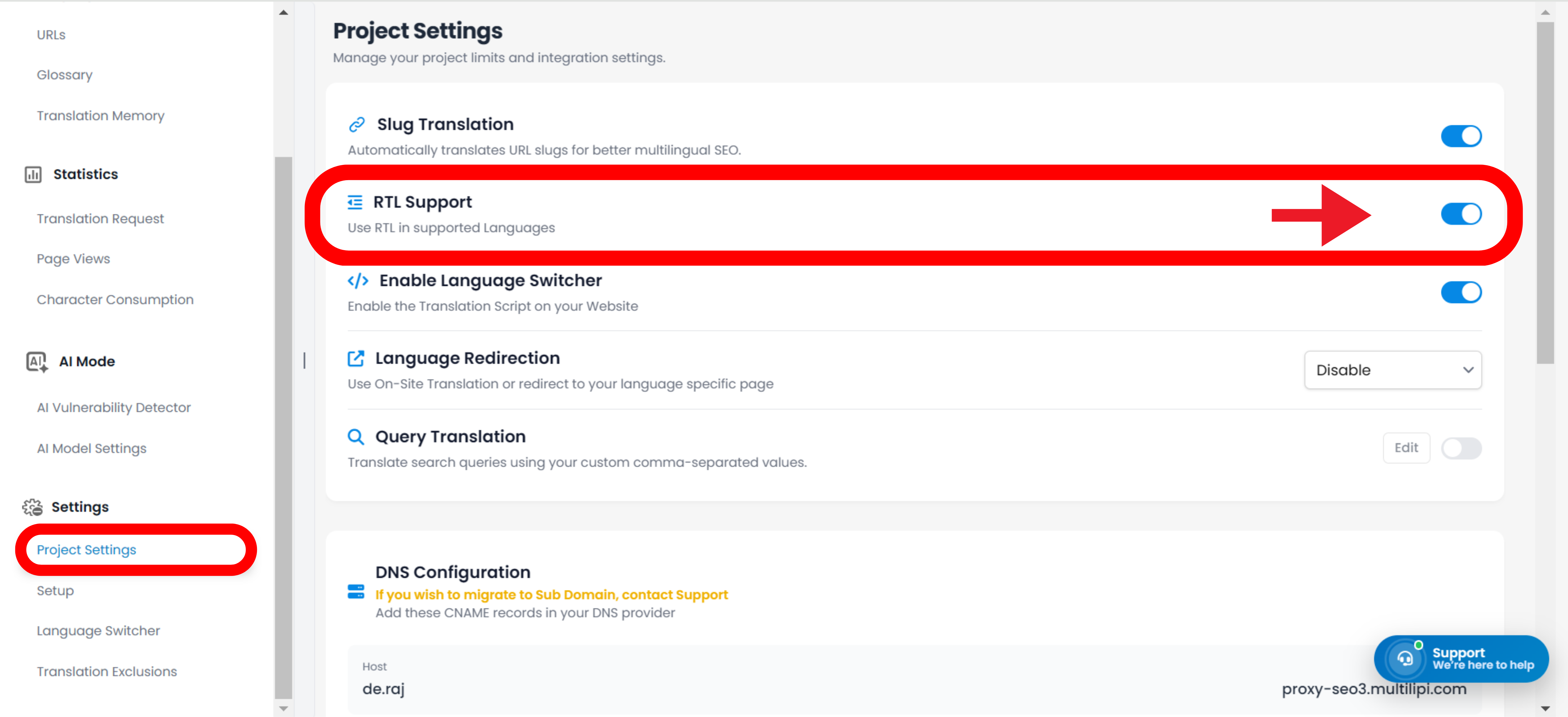
Navega a la Configuración sección en la barra lateral izquierda.
Haz clic en Configuración del Proyecto.
Paso 3: Activar Motor
Desplácese para encontrar el Soporte RTL interruptor.
Acción: Cámbielo a ACTIVADO (Azul).
Acción del Sistema: La capa de inyección CSS ahora está activa.
3. Comportamiento Técnico
Cómo funciona en el navegador.
Una vez habilitado, el motor realiza las siguientes operaciones dinámicamente:
Atributo de Dirección
Inyecta automáticamente dir="rtl" en el HTML <html> etiqueta cuando un idioma RTL está activo.
Volteo de CSS
Virtualmente "voltea" las propiedades CSS estándar.
float: left se convierte en flotar: derecha.
margen-izquierda: 10px se convierte en margen-derecha: 10px.
Integración del Conmutador
Si utiliza el Conmutador de Idiomas MultiLipi, la interfaz de usuario cambiará instantáneamente de orientación en el momento en que un usuario seleccione árabe o hebreo, proporcionando una transición fluida.
Nota: No se requieren anulaciones manuales de CSS. El sistema maneja los cálculos de geometría automáticamente.