

1. The GEO Advantage (Why Sub-Directories?)
Optimization for the AI Era.
Traditional SEO focused on keywords. Optimización del Motor Generativo (GEO) represents a fundamental shift—focusing on "Entity Authority" and semantic understanding. AI models like ChatGPT, Gemini, and Perplexity evaluate whether your brand is a coherent, authoritative entity. Sub-directories consolidate all multilingual content under one domain, dramatically increasing citation probability in AI-generated answers.
Citation Authority
Usando site.com/fr/ en lugar de fr.site.com signals to AI models that your content is an integral part of your main brand entity. This unified structure significantly increases citation probability across all language markets.
Knowledge Graph Consolidation
All traffic, backlinks, and engagement signals feed into a single domain authority score. Every backlink to site.com/es/ strengthens your entire domain—including site.com/fr/ and site.com—creating a unified authority profile that AI models recognize as trustworthy.
2. Deployment Prerequisites
Requirements for virtual sub-directory routing.
To enable virtual sub-directory routing without creating physical folders on your server, your environment must meet these constraints:
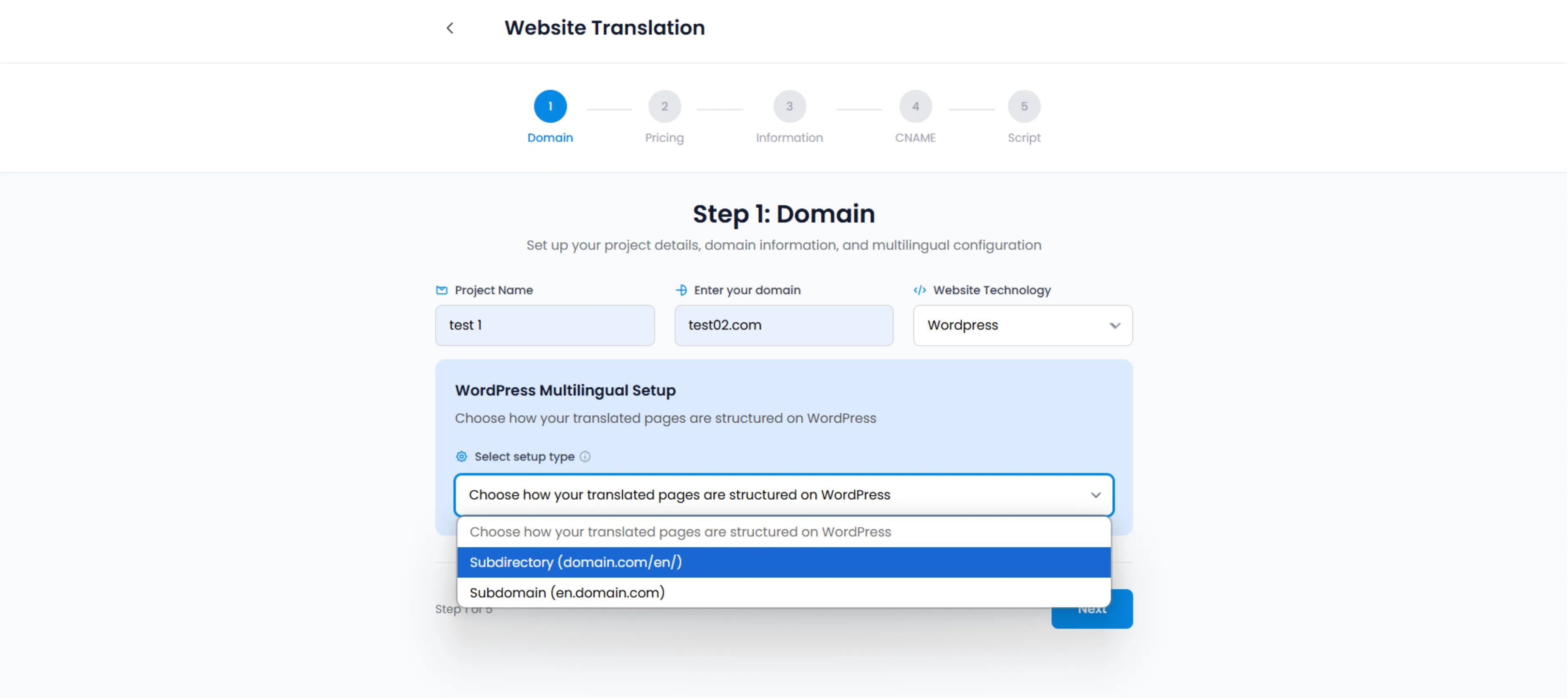
Selecciona Sub-directory (domain.com/en/) during project setup to enable consolidated SEO authority
Permalinks Configuration
Your WordPress Permalinks must be set to anything other than "Plain". (e.g., "Post name" is recommended).
Ruta: Settings → Permalinks
Server Rewrites
Your server must support URL rewriting.
Apache:
Requires .htaccess support (Standard on 99% of WP hosts).
Nginx / LiteSpeed:
Usually works out of the box.
MultiLipi Plugin
The official plugin acts as the traffic controller, intercepting requests to /fr/ and serving the translated payload dynamically.
3. How the Routing Engine Works
No physical folders required.
When a user requests yoursite.com/fr/about, MultiLipi does no look for a folder named fr on your server.
1. Interception
The MultiLipi plugin intercepts the 404 request that would normally occur.
2. Injection
It queries our API for the French version of the "About" page.
3. Delivery
It serves the translated HTML dynamically while keeping the URL structure intact.
4. Metadata Sync
It automatically injects the correct hreflang tags, identifying the page as a localized alternate.
4. Troubleshooting Protocol (404 Errors)
Fix common permalink issues.
If you enable sub-directories and your translated pages return a 404 Not Found error, it is almost always a "Permalinks Flush" issue.
The Fix Protocol:
1. Access Admin
Go to your WordPress Dashboard.
2. Navigate
Go to Settings → Permalinks.
3. Flush Rules
Click "Save Changes" to regenerate rewrite rules.
4. Clear Cache
Purge all caches if using WP Rocket or W3 Total Cache.
Indicador de éxito:
After completing these steps, your sub-directory URLs (e.g., /fr/about/) should load properly without 404 errors.