

Para entornos de WordPress, mantener el control sobre las estructuras de URL es fundamental para el SEO local. El plugin MultiLipi para WordPress incluye una opción dedicada Administrador de Slugs de URL que te permite definir reglas de mapeo explícitas entre tus rutas de origen (por ejemplo, /acerca-de-nosotros/) y sus destinos localizados (por ejemplo, /ruta-traducida/). Esto asegura que tus palabras clave específicas se conserven en la estructura de la URL antes de que la solicitud salga de tu servidor.
Esta guía detalla el protocolo para definir estos mapas de enrutamiento.
1. La Arquitectura de Mapeo
Cómo maneja el plugin el enrutamiento.
El plugin actúa como un interceptor. Cuando una solicitud llega a tu sitio de WordPress para una ruta traducida definida en este administrador, el plugin identifica el mapeo y sirve el contenido subyacente correcto sin generar un error 404. Esto te permite "enmascarar" las URL en inglés con slugs en el idioma nativo sin problemas.
2. Protocolo de Configuración
Gestiona estas reglas directamente desde tu Panel de Administración de WordPress.
Paso 1: Accede al Contexto de WP Admin
Inicia sesión en tu Panel de Administración de WordPress (/wp-admin).
Asegúrate de que el plugin MultiLipi esté instalado y activo.
Paso 2: Inicializar el Administrador de Slugs
En la barra lateral principal de WordPress, localiza y haz clic en MultiLipi.
Desde el submenú, selecciona Slugs de URL.
Contexto: Esto abre la pantalla del Administrador de Slugs de URL de MultiLipi, mostrando todos los mapas activos.
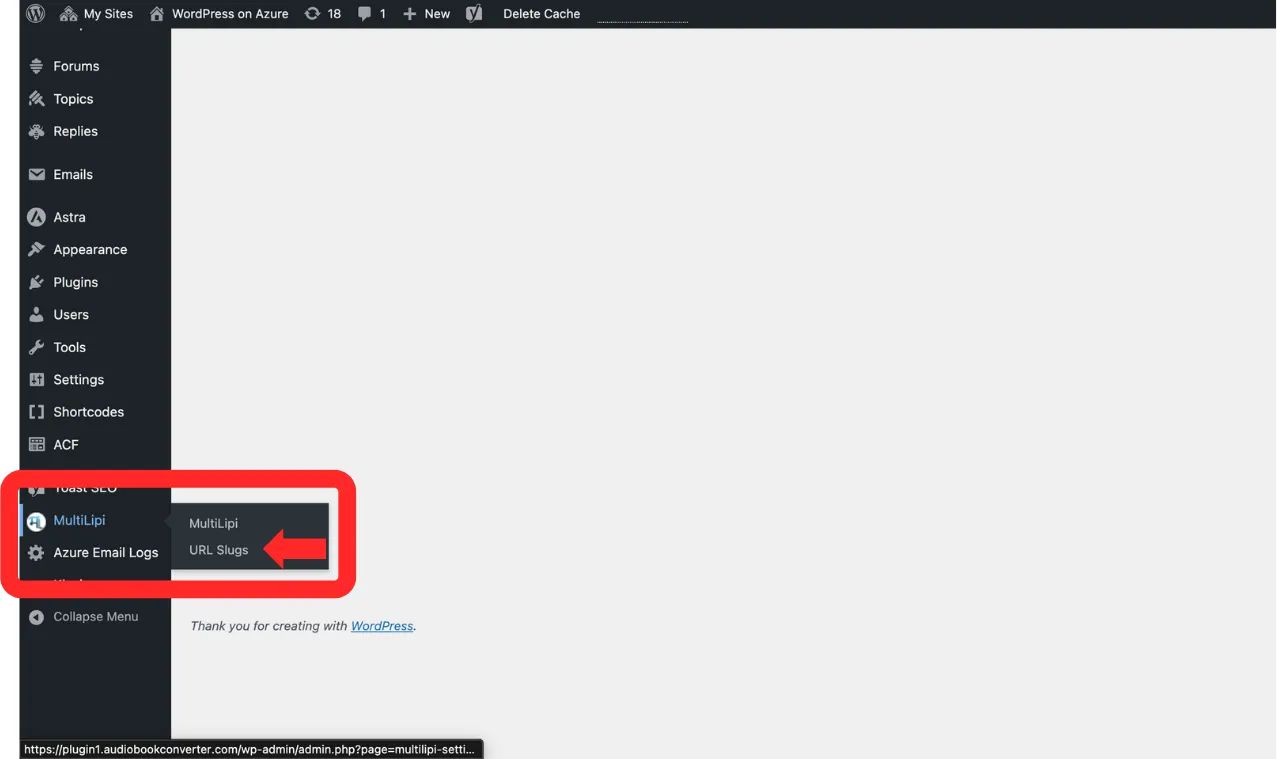
Navega a MultiLipi → Slugs de URL desde la barra lateral de WordPress
Paso 3: Definir Nueva Regla
Haz clic en "+ Añadir nuevos slugs" botón.
Aparecerá una nueva fila de entrada. Rellena el esquema de la siguiente manera:
Idioma: Selecciona el código de localización de destino (por ejemplo, hi — Hindi).
Ruta Original: Ingrese la URL de origen existente (por ejemplo, /pagina-de-ejemplo/). Nota: Esta página ya debe existir.
Ruta Traducida: Introduce el slug personalizado deseado (por ejemplo, /ruta-traducida/).
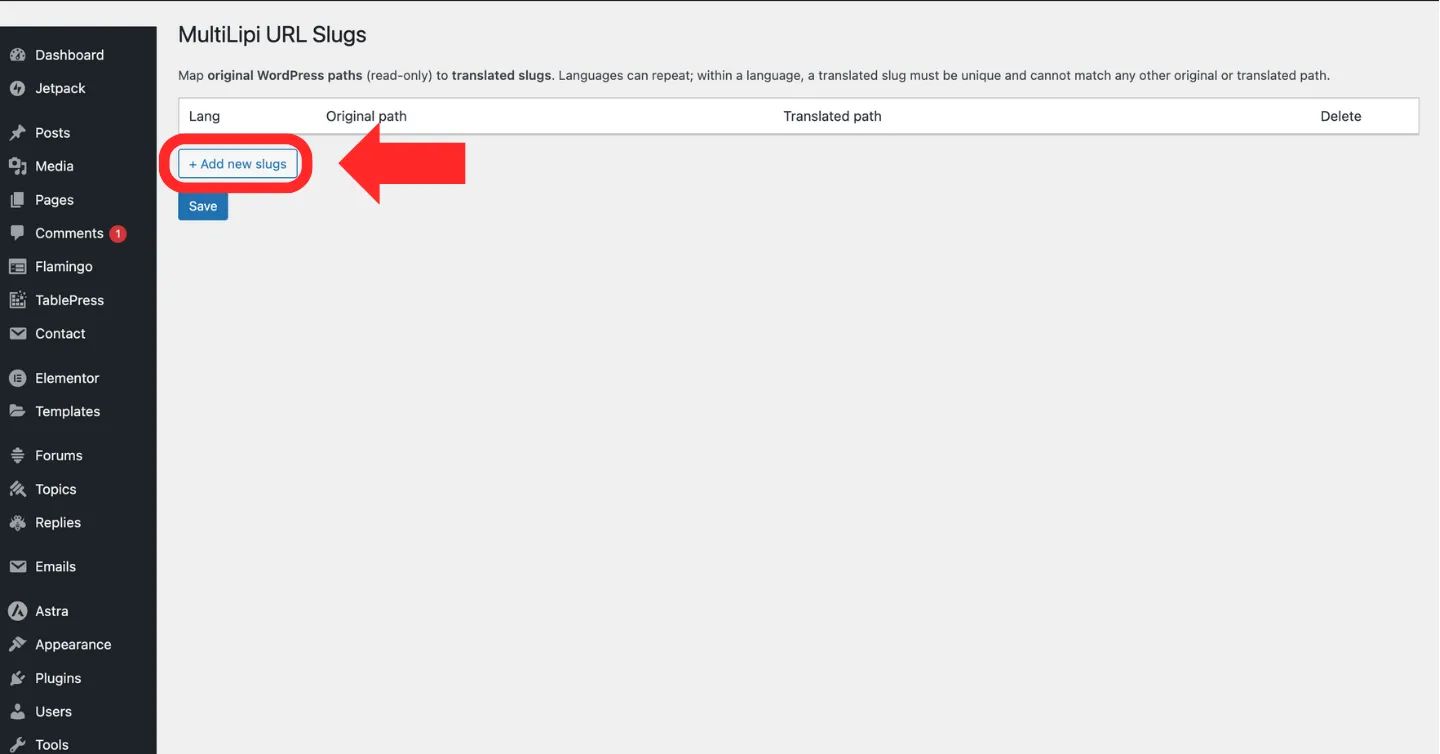
Haz clic en "+ Añadir nuevos slugs" botón para crear una nueva regla de mapeo de URL
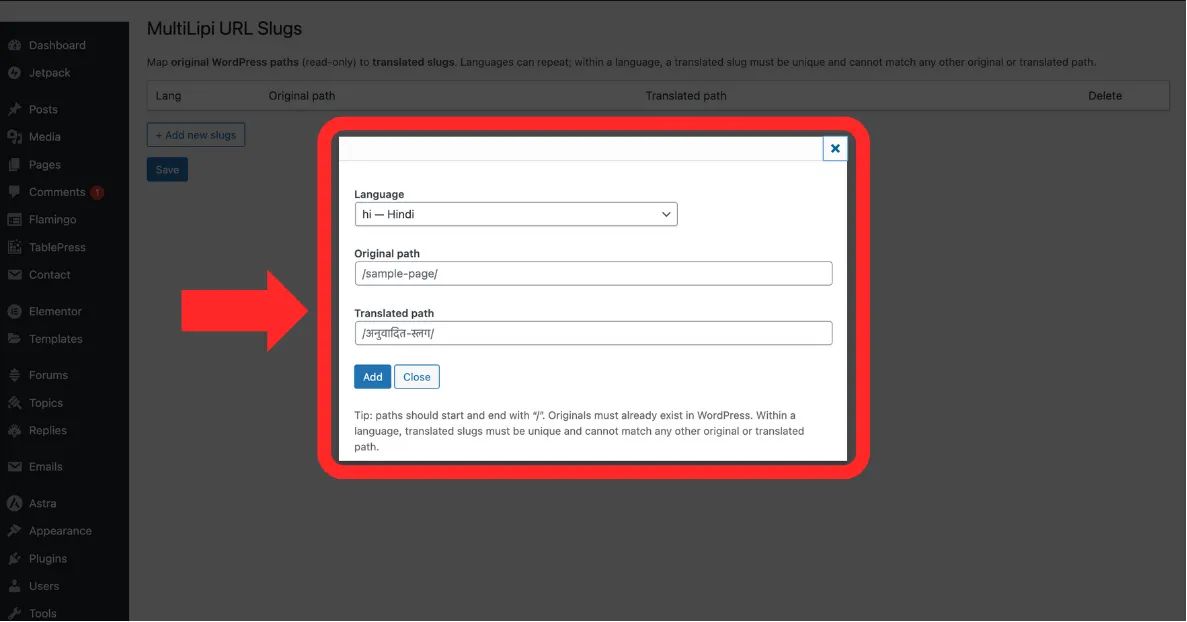
Rellena los Idioma, Ruta Original, y Ruta Traducida campos
Paso 4: Confirmar Mapeo
Haz clic Guardar para aplicar la regla.
Acción del Sistema: El mapa de enrutamiento se actualiza inmediatamente. Los usuarios que navegan en hindi y visitan la ruta traducida ahora verán el contenido correcto.
3. Validación y Restricciones
Reglas de ingeniería para rutas válidas.
Para prevenir errores de enrutamiento o bucles infinitos, el sistema aplica las siguientes restricciones estrictas:
Consistencia de Barras
Cada ruta (Original y Traducida) debe comenzar y terminar con una barra diagonal /.
Correcto: /acerca-de-nosotros/
Incorrecto: acerca-de-nosotros
Unicidad
El Ruta Traducida debe ser único dentro de ese idioma específico. No puedes asignar dos páginas diferentes al mismo slug.
Comprobación de Existencia
No puedes mapear una "URL fantasma". La Ruta Original debe referirse a una página válida y publicada en tu sitio de WordPress.